 FullMods Minecraft knowledge base, models, mods, manuals, latest version of minecraft, servers, minecraft pack, FullMods.com special trick

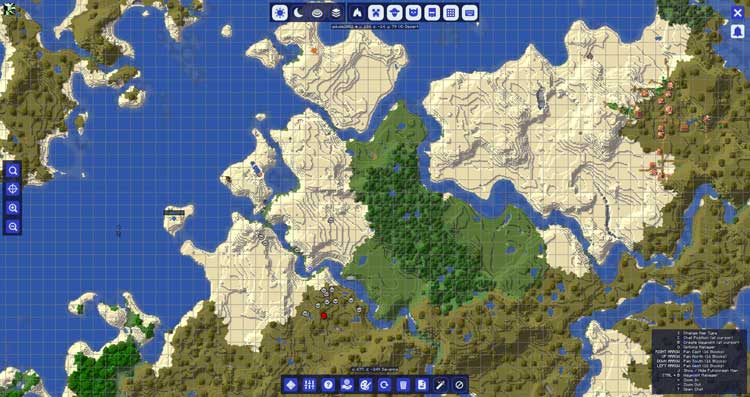
JourneyMap Mod 1.21.8 brings a dynamic and highly customizable mapping system to Minecraft, making exploration more intuitive and informative than ever before. As you move through your world, the mode automatically charts the terrain and generated structures you’ve discovered, while leaving unexplored regions in darkness until you reach them—adding a touch of mystery to your adventures.
What sets JourneyMap apart is its flexibility. Through the built-in configuration menu, players can tailor the map display to suit their preferences. You can choose to show or hide animals, players, and hostile mobs, toggle visibility for terrain features and structures, and even adjust how the topography is rendered.
Another standout feature is the ability to mark Points of Interest (POIs) on your map. Found a stunning mountain peak, a hidden cave, or your dream building spot? Save it with a marker! Not only do these markers help you keep track of special places, but you can also share them with friends—perfect for multiplayer coordination and exploration.
JourneyMap offers three convenient viewing modes:
-
A mini-map in the corner of your game screen for real-time navigation.
-
A full-screen map that gives you a broad overview of the world—one of the mod’s most iconic features.
-
And a web-based map , viewable on your PC or even mobile devices (Android and iOS), allowing you to track your world from outside the game.
Whether you’re exploring solo or playing with others, JourneyMap transforms how you navigate Minecraft. With it, getting lost is a thing of the past.
Screenshot
How to Install Minecraft JourneyMap Mod ?
- Download and Install Minecraft Forge
- Download Minecraft JourneyMap Mod
- Double-click on the file downloaded from Forge to run the installer.
- Unzip the downloaded file from the mod.
- Paste the downloaded file the folder .minecraft/mods
- Run Minecraft. Enjoy.
Download